belt
Local AI for your agent workflow
The models live at home.
Give your agents a team of local specialists. Coding, extraction and reasoning run on your Mac, with the right model for the job.
For Apple Silicon Macs. Free for non-production use.
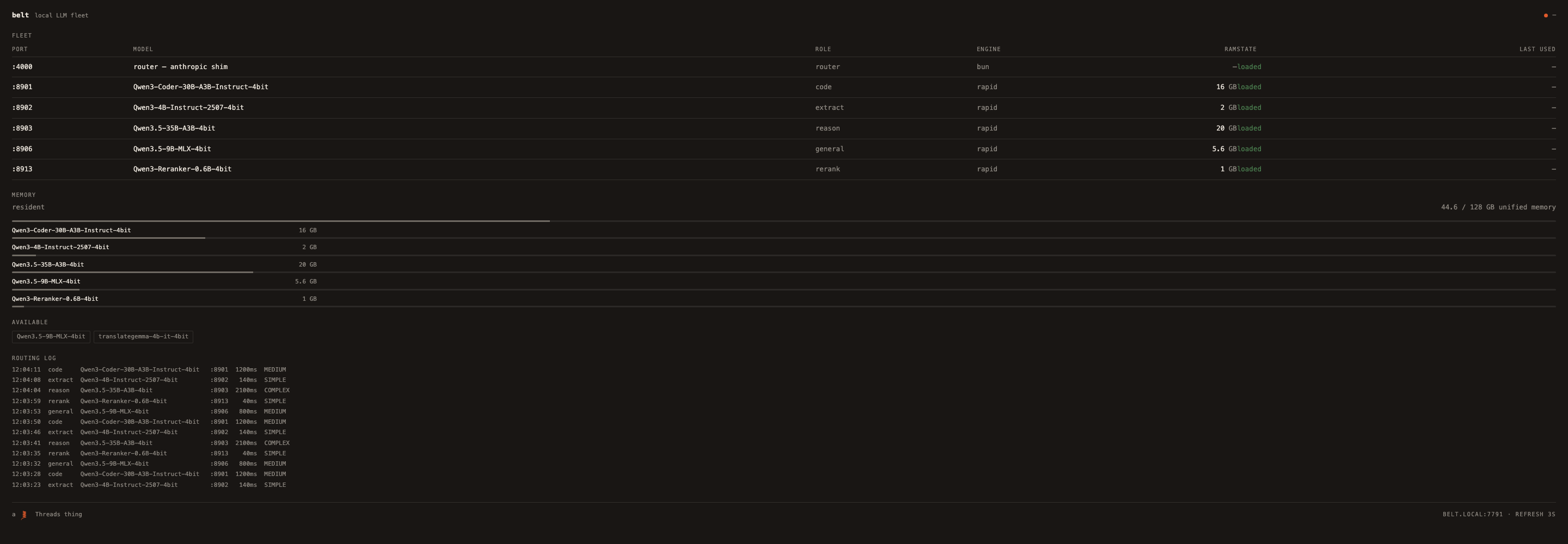
Match the model to the work.
Send routine extraction, coding and deeper reasoning to specialists suited to each task.
Keep local work local.
Run inference on your own machine. Switch cloud routing off when you want a fully local workflow.
Know what is running.
See model availability and memory use together, so the fleet is easier to understand and manage.
In use
One request. The right specialist.
Belt routes a task to a local model, runs the work and returns the result to your agent. The routing follows explicit rules, so you can inspect how a request finds its destination.
Ask from your workflow
Your agent sends the work to Belt.
Route to a specialist
The task is matched to the configured local model.
Bring the result back
Your agent receives the answer and carries on.
Built for your machine
Local power. Visible limits.
Local models use real memory. Belt shows what is loaded and keeps its model configuration in one place. Start with the installation guide to choose a fleet that fits your Mac.
Requires Apple Silicon and Bun. The documented resident setup needs roughly 64 GB of memory headroom; smaller configurations depend on the models you choose.
Get started with belt
Put it to work.
Installation, configuration and licensing are in the project documentation.
For Apple Silicon Macs. Free for non-production use.